

Anticheat and security platform for FiveM
Your server decides.Not the mod menu.
SafeGuard checks what players actually do (movement, combat, entities, events and money) on the server, where cheats can't reach. Every decision is scored, explained and backed by evidence.
- Detections
- 62
- Frameworks
- 6
- Cloud needed
- No
Works with your framework, detected automatically
- ESX
- QBCore
- Qbox
- vRP
- vRPex
- Standalone
Why server-side
A bypassed client changes nothing
Client-side anticheats lose the moment a menu hooks the game. SafeGuard keeps its judgement on the server, and treats whatever the client says as a hint.
The client is untrusted
Anything the game client reports can be forged. SafeGuard uses it as a hint, never as proof.
The server is the authority
Decisions come from state FXServer can verify: positions, entities, damage, events and money.
The cloud is the shared memory
History, evidence and bans across your servers. If the cloud is unreachable, protection carries on.
Features
Everything your staff needs to keep cheaters out
Protection, evidence and tooling in one resource and one dashboard. Every plan includes all of it.
EventShield
A firewall for server events: rate limits, argument checks, permissions and honeypot events only a cheat would call.
Risk Engine
Signals are weighted by confidence and fade over time. Punishments follow sustained risk, never a single flag.
Movement and combat
Speed, teleport, noclip, godmode, super jump, out-of-range and multi-target hits, with grace for spawns and scripted teleports.
Entities and explosions
Blocked models, spawn floods, remote and invisible explosions, and weapon damage modifiers, checked by the server.
Economy guard
Scripts declare legitimate payouts. Money spikes, limits and duplication outside them are flagged.
Evidence and live view
Telemetry, instant screenshots and live spectate from the dashboard, behind every decision and ready when a player disputes a ban.
Bans and appeals
Bans follow players across your servers. Each one has a public page where the player can appeal to your staff.
Discord
Alerts in your staff channels and a bot for /ban, /player, /detections and /screenshot, limited to your staff roles.
Resource scanner
Finds backdoors, leaked keys and unprotected events in your resources. Only the findings leave your machine.
How it works
Protected in three steps
No client installs and no changes to your resources. SafeGuard runs next to them.
- 1
Add the resource
Copy safeguard into your resources folder and ensure it after your framework.
- 2
Paste your license
Use set, never setr, so the key never leaves the server.
- 3
Open the dashboard
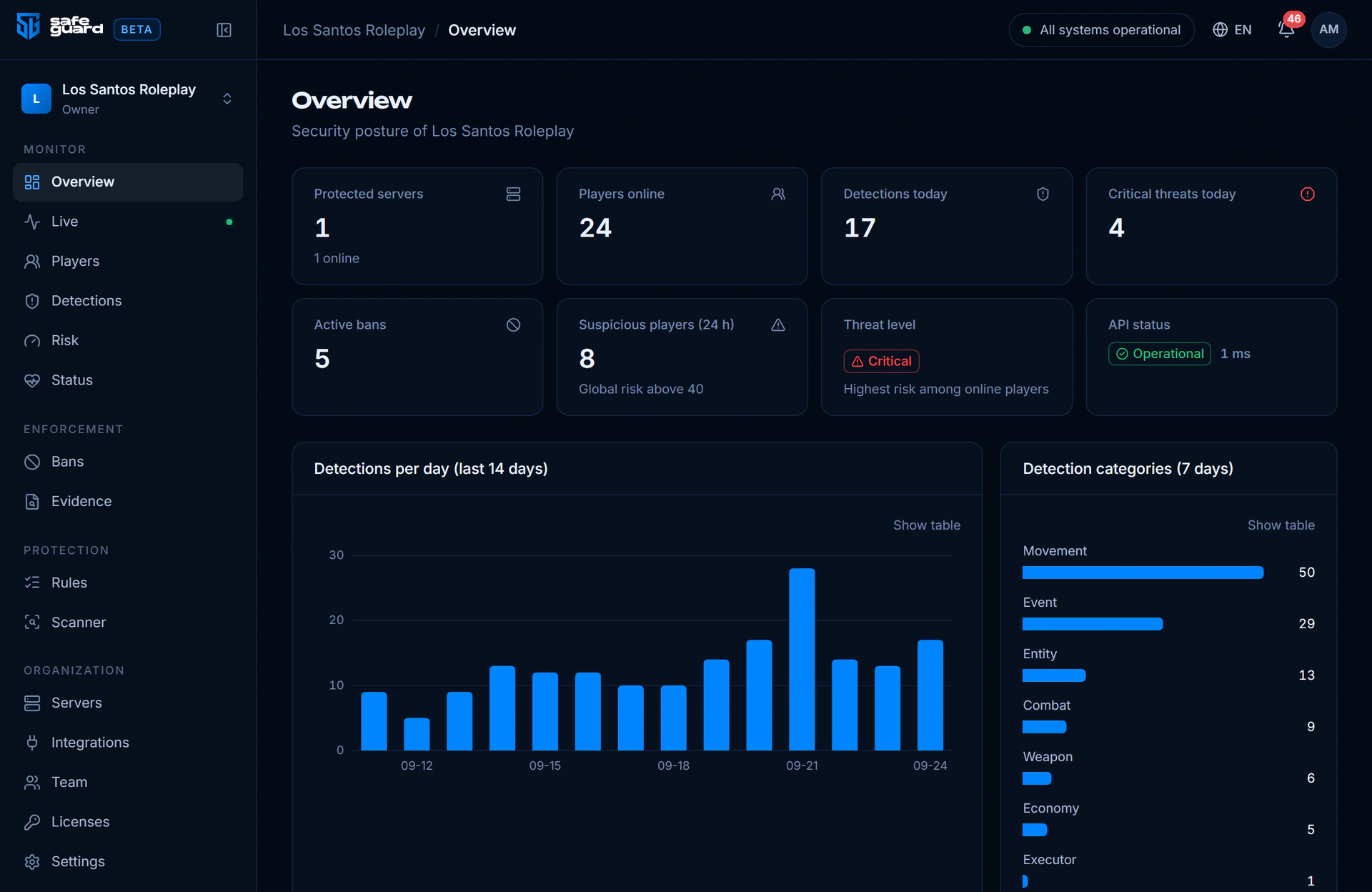
Your server shows up on its first start, with players, detections and bans live.
# SafeGuard
set onesync on
set safeguard_cloud_url "https://api.…"
set safeguard_license_key "alk_…"
ensure safeguardDetections
62 checks across eight areas
Each detection has a confidence and a weight in the Risk Engine. You tune sensitivity per detection from the dashboard, or from config.lua in local mode.
Movement
13Speed, teleports, noclip, godmode and more.
- Teleport
- Speed hack (on foot)
- Noclip
- Fly
- Super jump
- +8 more
Combat
8Hits that do not add up: range, angle and targets.
- Impossible hit angle
- Aim snap
- Abnormal headshot ratio
- Hit without line of sight
- Hit beyond weapon range
- +3 more
Weapons
5Blacklisted weapons, damage modifiers and rapid fire.
- Blacklisted weapon
- Weapon given to another ped
- Damage modifier
- Rapid fire
- Weapon not in the inventory
Entities and explosions
10Spawns and explosions, checked by the server.
- Blacklisted entity model
- Entity spam
- Mass spawn
- Blacklisted explosion
- Invisible / silent explosion
- +5 more
Events
9EventShield rules for every protected resource.
- Honeypot event
- Forbidden event
- Exploit attempt on a script this server does not run
- Event schema violation
- Event rate limit
- +4 more
Economy
3Money that appears without a reason.
- Money spike
- Economy limit exceeded
- Duplication
Client integrity
10Heartbeats and challenges the real client always answers.
- Missed heartbeats
- Heartbeat sequence gap
- Replayed heartbeat
- Challenge-response failed
- Session token mismatch
- +5 more
Executors
4Traces left by injected menus and scripts.
- Blacklisted command
- Unknown resource
- Suspicious global
- Anticheat resource stopped
Defensive by design
Built to protect, not to intrude
No secrets on the client
License keys and webhooks stay on the server. The client files hold nothing worth stealing.
Privacy settings you control
Choose how IP addresses are kept and how long data is stored. Hardware tokens are only ever stored hashed.
Your code stays yours
The scanner runs on your machine and uploads findings only, never source code.
Signed updates
Releases are signed and verified file by file before install, with a one-command rollback.
Pricing
One product, every protection
Every plan has every protection. Longer plans keep more history, fit a bigger staff and add extras, and your first month comes with 7 extra days free.
Monthly
For a live community that wants to stay flexible.
- 1 server
- First month with 7 extra days free
- 30 days of detection and evidence history
- Up to 5 staff members
- 5 resource scans a month
- Card or MB WAY, cancel at any time
Yearly
The same protection, billed once a year, with more room and extras.
- 2 servers (production and testing)
- Save 49% compared with monthly
- 180 days of detection and evidence history
- Up to 15 staff members
- Unlimited resource scans
- Discord staff bot and integrations
- Early access to beta versions
- Priority support on Discord
- Price locked while you renew
Enterprise
For networks running several servers under one staff team.
- Up to 10 servers
- 365 days of detection and evidence history
- Unlimited staff members
- Everything in the yearly plan
- Installation and rules review with our team
- Guaranteed response time
- Price and billing agreed with you
Every plan includes
- All detections and the Risk Engine
- EventShield event firewall
- Evidence, bans and appeals
- Dashboard for your whole staff
- Discord alerts and staff bot
- Resource scanner
FAQ
Questions server owners ask
Does SafeGuard need the cloud to protect my server?
No. Every protection runs on your FXServer. Without the cloud, SafeGuard works in local mode, configured from config.lua, and keeps its own bans, evidence log and Discord alerts. The cloud adds the dashboard, history across servers and shared rules. If it becomes unreachable, the server keeps protecting and syncs later.
Will it ban my players by mistake?
SafeGuard is built to avoid that. A single detection never bans anyone: signals are weighted by confidence and add up to a risk score that decays over time. Spawns, respawns and scripted teleports get grace windows, staff are exempt, and a dry-run command lets you test rules on a real player. When a ban happens, it comes with the evidence behind it and a public page where the player can appeal.
Which frameworks are supported?
ESX, QBCore, Qbox, vRP, vRPex and standalone servers. SafeGuard detects the framework on its own. Adapters read jobs, money and permissions so staff are recognised and economy checks match your server.
Can cheaters bypass it?
Anything running on the player's PC can be tampered with, so SafeGuard treats the game client as untrusted. Its client checks are extra signals. Decisions come from what the server can verify: positions, entities, damage, events and money.
Does it need OneSync?
Yes. OneSync gives the server authority over entities, which the entity, explosion and damage checks rely on. Any current FXServer build supports it.
What data does SafeGuard keep?
Detections, risk history, bans and the evidence behind them. You decide whether IP addresses are stored, hashed or dropped, hardware tokens are only ever stored hashed, and you choose how long data is kept. The resource scanner only uploads its findings, never your code.
How are updates installed?
Never silently. SafeGuard tells you when a new release is available. Releases are signed, and the installer verifies every file before anything changes. The previous version is kept, so a rollback is one command.
Put your server in charge.
Your first month comes with 7 extra days free. It takes a few minutes to set up, and your server stays protected even without the cloud.